Completion requirements
Information about this platform
ALL
1 |
|---|
Question: (Last edited: Wednesday, 26 July 2023, 4:20 PM)2. Who can access the Online Campus? | |||
|---|---|---|---|
| Answer:
All participants in the Skills 4 Abroad programme can use the Online Campus. The employees of the programme and the commissioned trainers also have access. Finally, other people who are directly involved with the assignment (e.g. the contact persons of the sending organisations who register outgoing experts and managers). | |||
Question: (Last edited: Wednesday, 26 July 2023, 4:23 PM)3. When can I see changed in my booked trainings on the Online Campus? | |||
|---|---|---|---|
| Answer:
All training information is transferred to the Online Campus as anonymised data from the booking platform "learning.giz" once a day. Changes such as the composition of the participants, room details or rebookings, will then appear here in the system. | |||
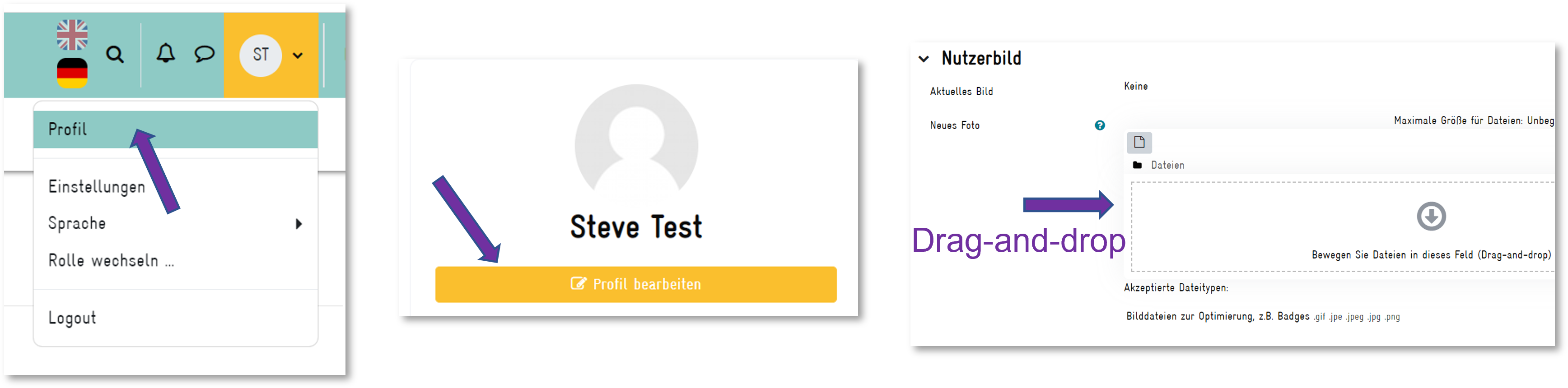
Question: (Last edited: Wednesday, 26 July 2023, 4:26 PM)4. How can I setup and edit my profile? | |||
|---|---|---|---|
| Answer:
| |||
Question: (Last edited: Wednesday, 26 July 2023, 4:25 PM)5. How can I add a profile picture? | |||
|---|---|---|---|
| Answer:
| |||
Question: (Last edited: Wednesday, 26 July 2023, 4:27 PM)6. Where can I edit my email notifications? | |||
|---|---|---|---|
| Answer:
You
can pick and choose for which activities you would like to receive notifications.
If you want to, or no longer want to, be informed about updates in
forums or messages via e-mail, proceed as follows: Click on the bell
in the upper right corner and then on the gearwheel of the system notifications.
A list will then open with all the possible notifications you can receive. By
clicking on the button under E-Mail, you can now adjust the notifications | |||
Question: (Last edited: Friday, 31 May 2024, 1:34 PM)7. How does the booking of practical consultation work? | |||
|---|---|---|---|
| Answer: | |||

Question: (Last edited: Wednesday, 26 July 2023, 4:30 PM)8. How can I change the language of the Online Campus? | |||
|---|---|---|---|
| Answer:
You can use the Online Campus in German or English. Some training content is available in both languages. To change the setting, simply click on the corresponding country flag in the top navigation bar. | |||